Where to find themes
There are many sources to find themes for your website. Hundreds of websites online are created to sell or offer themes. The most trustworthy site to get themes from is WordPress itself. You can either get them from clicking the “appearances” menu in WordPress.com, then clicking on “Themes”, or by searching for themes at WordPress.org. There are many factors to consider when choosing themes, including safety risks, ratings/reviews, how many downloads, recent updates, compatibility, responsiveness1, and overall appearance.
What files must be included within a WordPress theme?
“style.css” and “index.php” are the two required files for a WordPress theme to function. Some themes include extra files to make the site more customizable, such as “functions.php”, which contains custom code to register widget areas, theme features, sidebars, and menus. There could also be a file named “footer.php”, which contains the closing HTML tags and footer content via get_footer().
Why did I choose the Hestia theme out of all the others?
I conducted a thorough evaluation of many themes. I experimented with lots of other themes on the WordPress Theme menu and created a matrix of the top three that I liked the most:
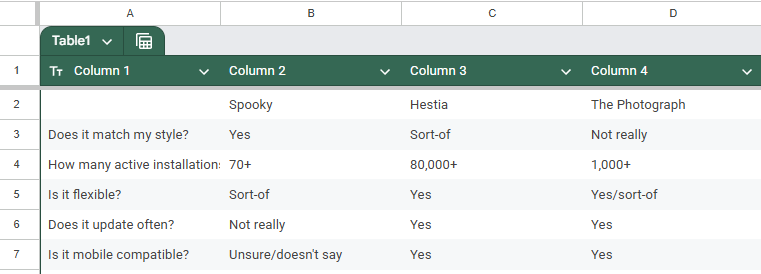
I considered for each, whether or not it matched my style, how many installations it had, if it was flexible, if it had been updated recently, and if it was responsive. I concluded that Hestia was the best option for me.
Though I saw more info about the theme on WorPress.org during research on it, I installed the theme via the WP-Admin. It was very simple, and the theme has been great so far.
responsiveness1 – When a website is compatible with both mobile devices and computers.

0 Comments